Common Phishing Scams and How to Spot Them Instantly
Phishing has never relied on perfect technology. It relies on people making quick decisions under pressure. In 2026 the messages look cleaner, the voices sound more familiar, and the timing feels more personal, yet the core goal remains the same: get you to click, approve, transfer money, or hand over credentials before you stop to think.
AI has made the lures more polished and more scalable. Deepfake audio and video now appear in real calls. Personalized emails reference real projects or recent purchases. Multi-channel campaigns move from email to text to a phone call within minutes. Despite the sophistication, most successful attacks still succeed because of a small set of human habits—urgency, deference to authority, and the tendency to trust familiar branding. The good news is that the same practical checks that worked years ago still catch the majority of these attempts when applied consistently.
This guide covers the phishing patterns most people actually encounter today and the fast, reliable ways to recognize them before damage occurs.
Why Phishing Remains So Effective
Attackers no longer need imperfect English or obvious fake logos. Generative tools produce fluent, context-aware messages at scale. Public information from LinkedIn, company websites, and social media supplies the personal details that make a message feel legitimate. Once a victim engages, the conversation can shift channels—email to text, text to a voice call with a cloned voice—creating a sense of continuity that lowers skepticism.
Statistics from 2026 reflect the shift. A large share of phishing is now AI-assisted. Deepfake incidents during employee calls are reported by a significant percentage of security leaders. Business email compromise and fund-transfer fraud continue to drive substantial financial losses. Adversary-in-the-middle kits that capture both passwords and multi-factor approvals remain a preferred method for bypassing traditional second factors.
The underlying weakness is rarely the absence of technical controls. It is the moment a person acts on an unexpected request without independent verification.
The Most Common Phishing Scams in 2026
Credential-harvesting emails and fake login pages
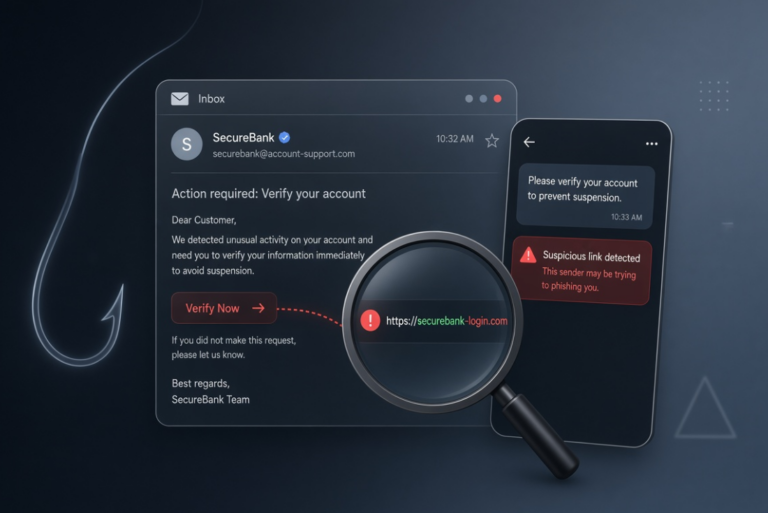
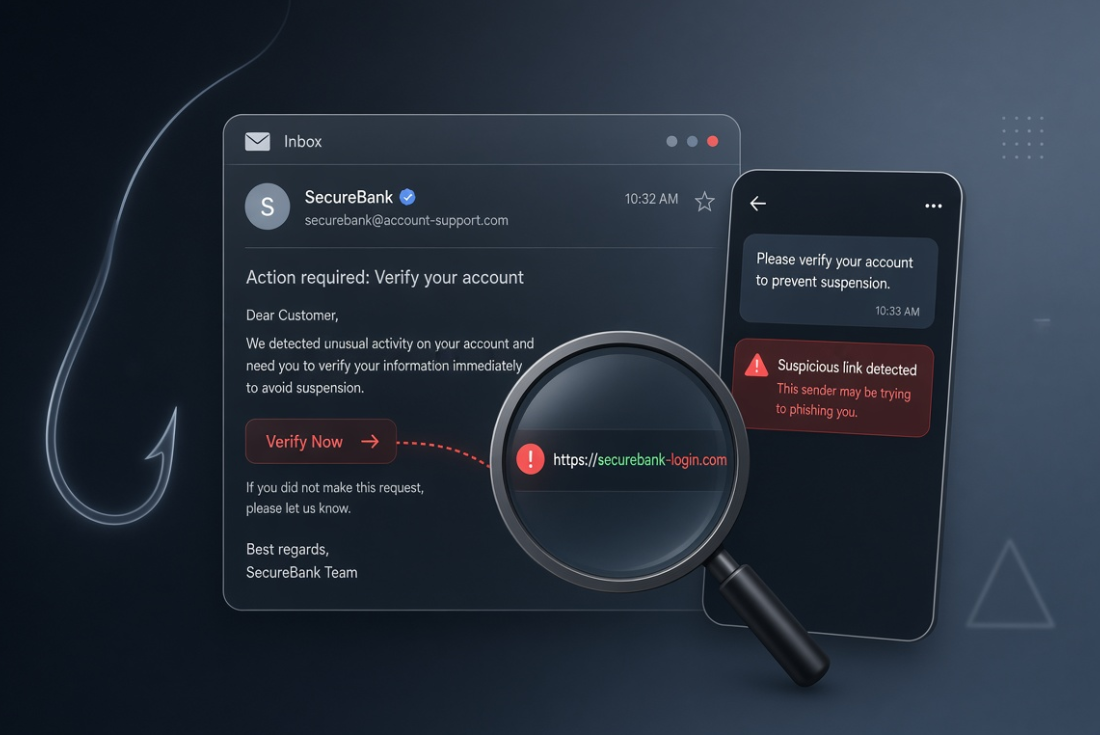
These remain the highest-volume attacks. A message claims your account will be locked, a package needs attention, or a document is waiting. The link leads to a convincing copy of a real login page. In more advanced versions, an adversary-in-the-middle proxy sits between you and the real site, capturing both the password and the multi-factor approval in real time.
Business email compromise and executive impersonation
An attacker poses as a CEO, CFO, or vendor and requests an urgent payment, a change in bank details, or the release of sensitive files. AI helps match writing style and reference real internal projects. The request often arrives at a busy moment—end of month, during travel, or near a known deadline—when people are more likely to act quickly.
Voice phishing (vishing) and deepfake calls
A phone call or voice note appears to come from a colleague, manager, bank representative, or even a family member. With only a short sample of public audio, tools can clone a voice convincingly. The caller creates urgency—an overdue invoice, a security alert, a family emergency—and pushes for immediate action such as a wire transfer or sharing a one-time code.
SMS and messaging phishing (smishing)
Short texts claim a delivery problem, an account issue, or a prize. Links are shortened or use look-alike domains. These campaigns often serve as the first step that moves the conversation to a phone call or a fake website.
Device-code and consent phishing
Instead of asking for a password, the message instructs you to visit a real Microsoft or Google login page and enter a short code. Approving the code grants the attacker access to your account or connected applications without ever seeing your password. These attacks have grown sharply because they abuse legitimate sign-in flows.
IT support and help-desk impersonation
A caller or message claims to be from internal IT or a service provider and asks you to approve a multi-factor prompt, share a code, or install remote-access software “to fix a problem.” The goal is usually to gain a foothold on the device or account.
Instant Red Flags That Still Work
Even with AI-generated content, certain signals remain reliable:
- The actual sender address does not match the claimed organization. Look past the display name at the full email address or domain.
- Links do not go where the text claims. Hover (or long-press on mobile) and examine the real destination before clicking.
- The request creates artificial urgency or threatens negative consequences if you do not act immediately.
- You were not expecting the message or the specific request.
- The message asks you to bypass normal procedures—send money a new way, approve an unusual login, or share a one-time code with someone who contacted you first.
- The tone or request feels slightly off for the person or company it claims to represent, even if the language is polished.
A simple five-second test helps: Was I expecting this? Does the real address make sense? Is it pushing me to click, pay, or share something sensitive right now? Can I verify the request through a channel I already trust? If any answer raises doubt, stop and check independently.
How to Verify and Respond
Never use contact details or links supplied in the suspicious message. Open a new browser tab and type the official website address yourself, or use a saved bookmark. For internal requests, call the person on a known number or message them on a different platform. For banks or service providers, use the phone number printed on a statement or the official app.
If you already clicked or entered information, act quickly. Change the password from a different, clean device. Revoke active sessions where possible. Enable or confirm multi-factor authentication. Monitor the account for unusual activity and contact the service’s fraud team. Report the message through the platform’s built-in reporting tools so filters can improve.
For organizations, short, realistic simulations that include text, voice, and multi-channel scenarios help people practice the pause-and-verify habit more effectively than long annual training sessions.
Building Habits That Scale
Technical filters catch many mass campaigns, but targeted and multi-channel attacks still reach inboxes and phones. The most durable defense is a consistent personal rule: unexpected requests that involve money, credentials, or access get verified through a separate, trusted channel before any action is taken. That single habit stops the majority of successful phishing attempts, regardless of how polished the message appears.
Combine it with the foundations covered in earlier articles—unique strong passwords stored in a manager and phishing-resistant multi-factor authentication—and the remaining risk drops further. Attackers will continue refining their methods. The practical response is not to memorize every new variant, but to treat urgency and unexpected requests with automatic skepticism and to verify before acting.
Can AI-generated phishing still be spotted by grammar or tone?
Often no. Modern tools produce fluent, natural language. Rely on sender domain, link destinations, unexpected requests, and independent verification instead of writing quality.
What should I do if I receive a deepfake voice call?
Hang up. Call the person back on a number you already have stored or that appears on an official statement. Do not use any number provided during the suspicious call.
Is it safe to click “unsubscribe” or “report” links in suspicious emails?
Prefer the reporting tools built into your email client or security software. Avoid interacting with links inside the message itself when possible.
How quickly do attackers act after a successful phishing click?
In many cases, within minutes. Changing credentials and reviewing sessions as soon as you suspect a problem limits the damage.
Should companies still run phishing simulations?
Yes, but short, frequent, and realistic ones that include newer channels (text, voice, collaboration tools) are more effective than infrequent, obvious email tests.
Phishing succeeds when people feel they must act before they can think. The most reliable counter is the opposite habit: pause, check the real source, and verify through a channel you already trust. That simple sequence remains effective even as the messages grow more convincing.
About the Author