A stolen or guessed password used to be enough to take over an account. In 2026 that is rarely true for anyone who has enabled a second factor—yet millions of people still treat two-factor authentication as optional. The numbers tell a clear story. Microsoft’s large-scale analysis of real accounts showed that multi-factor authentication reduced the risk of compromise by more than 99 percent overall, and still blocked the vast majority of attacks even when the password itself had already leaked. Credential-based attacks remain one of the most common ways accounts are taken over, and the simplest way to raise the cost for attackers is to require something beyond the password.
Two-factor authentication (often called 2FA or MFA) is no longer a “nice extra.” It is basic hygiene. The real question is no longer whether you should turn it on, but which method you choose and how carefully you set it up. Weaker forms still help against casual attacks. Stronger, phishing-resistant methods stop far more sophisticated ones. This article explains why the shift happened, what the different options actually protect against, and how to put the strongest practical setup in place without unnecessary friction.
What Two-Factor Authentication Really Does
At its core, multi-factor authentication requires two different kinds of proof before granting access. Something you know (a password or PIN) plus something you have (a phone, a hardware key, or a cryptographic credential on your device) or something you are (a biometric). The password can be stolen, phished, or found in a breach dump. The second factor makes that single secret insufficient on its own.
This changes the attacker’s economics. Credential stuffing—taking leaked username-password pairs and trying them everywhere—fails when the second factor is required. Basic phishing that only captures the password also fails. Even many automated bots are stopped cold. That is why security teams and standards bodies treat MFA as a baseline control rather than an advanced feature.
Not All Second Factors Are Equal
The label “two-factor authentication” covers a wide range of methods, and their real-world strength varies dramatically.
SMS and voice codes
These are the easiest to set up and still the most common for many consumer services. A code arrives by text or call. They stop simple password-only attacks, but they are the weakest option. SIM-swapping, number porting, and real-time interception remain practical risks. NIST currently treats SMS and voice delivered over the public telephone network as restricted authenticators, meaning organizations that rely on them must accept higher residual risk. Several major platforms are actively moving away from them; Microsoft, for example, is retiring its native SMS and voice delivery in favor of stronger methods.
Authenticator apps and push notifications
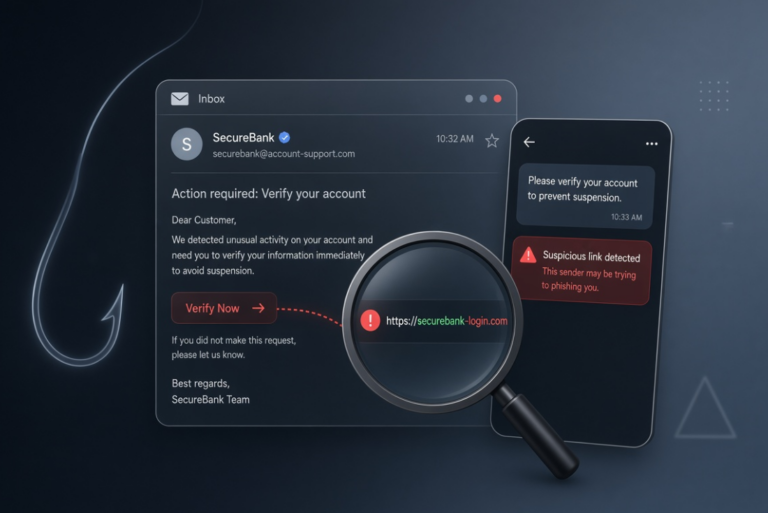
Time-based one-time passwords (TOTP) generated by apps such as Microsoft Authenticator, Google Authenticator, or Authy are a clear step up. Push notifications that ask you to approve a login are convenient. Both resist casual theft better than SMS. However, they are still vulnerable to real-time phishing (adversary-in-the-middle attacks) where the attacker proxies the legitimate site and captures the code or approval as you enter it. Push fatigue—bombarding a user with repeated approval requests until they accept one—is another known weakness. Number-matching (typing a number shown on the login screen into the app) reduces blind approvals but does not eliminate relay attacks.
Passkeys and hardware security keys
These are the current gold standard for phishing resistance. Passkeys (based on FIDO2/WebAuthn) and hardware keys such as YubiKeys bind the authentication cryptographically to the real website. A fake or proxied site cannot complete the challenge. There is no code to intercept and no push to approve. Device-bound passkeys and hardware keys offer the strongest protection; synced passkeys still provide excellent phishing resistance for everyday use while remaining convenient across devices. Where a service offers a passkey, it is usually the best choice available.
Common Ways Attackers Still Get Around Weaker MFA
Even with a second factor enabled, certain attack patterns succeed against the less robust methods:
- Real-time phishing proxies that capture the one-time code or push approval as the victim logs in.
- Push bombing or fatigue attacks that overwhelm the user into approving a malicious request.
- Social engineering of help-desk or recovery processes that reset the second factor without proper verification.
- Session token theft after a successful login, which bypasses the initial authentication entirely.
- SIM-swap or number-porting attacks against SMS-based systems.
These techniques explain why simply “having MFA” is no longer considered sufficient for high-value accounts. The method matters.
How to Set Up Strong Two-Factor Authentication Today
Start with the accounts that would cause the most damage if compromised: primary email, banking and financial services, work or cloud administrative accounts, and any service that can reset other accounts.
Prefer the strongest method each service supports. If a passkey is offered, register it. If only an authenticator app is available, use that and enable number matching where possible. Treat SMS as a last resort and plan to replace it when better options appear.
Protect the recovery process. Add more than one second factor so losing a phone does not lock you out. Avoid recovery methods that are weaker than the primary MFA. For important accounts, consider a hardware security key as a backup.
On your phone or computer, keep the authenticator app or passkey store itself protected with a strong device lock and, where available, biometric confirmation. Do not approve login requests you did not initiate.
For work or team accounts, prioritize phishing-resistant methods for administrators and remote access first. Adaptive or risk-based MFA (prompting only when signals look unusual) can reduce daily friction while still protecting high-risk logins.
Practical Habits That Keep MFA Effective
Turn it on for every account that offers it, even low-value ones. Consistency removes the temptation to reuse passwords or skip protection.
Review your enrolled methods periodically. Remove old phones or unused authenticators. Confirm that recovery options still work and are appropriately strong.
Be skeptical of unexpected MFA prompts. If you receive a push notification or code request you did not trigger, deny it and change the password on that account from a known-clean device.
Combine MFA with the habits covered in earlier articles: unique long passwords or passphrases stored in a manager, and caution around phishing messages. MFA is powerful, but it works best as part of a layered approach.
Frequently Asked Questions
Is SMS two-factor authentication still worth enabling?
Yes, if it is the only option available. It is better than nothing against basic attacks. Plan to upgrade to an authenticator app or passkey as soon as the service supports them.
Do passkeys replace the need for a password manager?
They reduce reliance on passwords for the sites that support them, but many services still require traditional logins. A password manager remains useful for those remaining accounts and for generating strong unique credentials.
What if I lose my phone or hardware key?
That is why backup methods matter. Register a second authenticator, a hardware key, or carefully managed recovery codes. Test the recovery process before you need it.
Can attackers still get in if I use strong MFA?
Strong phishing-resistant methods stop the vast majority of credential-based attacks. Remaining risks usually involve compromised devices, stolen session tokens after login, or social engineering of recovery processes. Device hygiene and careful recovery design close most of those gaps.
Should every account have MFA?
Prioritize high-value and high-risk accounts first. Once those are protected, extend it to as many others as practical. The more accounts that require a second factor, the smaller the blast radius if any single password is exposed.
Two-factor authentication stopped being optional the moment stolen passwords became a commodity. In 2026 the evidence is overwhelming: accounts without it are dramatically more likely to be compromised. The remaining work is choosing methods that resist modern phishing and keeping the setup maintained. Start with your most important logins, prefer passkeys or hardware keys where they exist, and treat weaker options as temporary bridges rather than permanent solutions. The extra step at login is small compared with the cost of recovering a taken-over account.
About the Author