The Biggest Cybersecurity Threats Right Now (And How to Protect Yourself)
Cybersecurity no longer feels like something that only happens to big companies or careless users. In 2026, attacks move faster, look more convincing, and hit closer to home than ever before. Ransomware still locks businesses and individuals out of their own data. Phishing messages now arrive with near-perfect timing and personal detail. Artificial intelligence helps attackers craft deeper fakes and exploit software flaws within hours of discovery. Meanwhile, supply-chain compromises turn trusted tools into unexpected entry points.
The shift is clear. Reports from ENISA, CrowdStrike, Verizon’s latest Data Breach Investigations Report, and others show vulnerability exploitation has overtaken stolen passwords as the leading way attackers get in. Ransomware remains one of the most damaging short-term threats. AI is accelerating almost every stage of an attack. The good news is that most people and small teams can still reduce their risk significantly with practical habits and a few solid tools. This guide walks through the threats that matter most right now and the concrete steps that actually help.
AI-Powered Phishing and Social Engineering
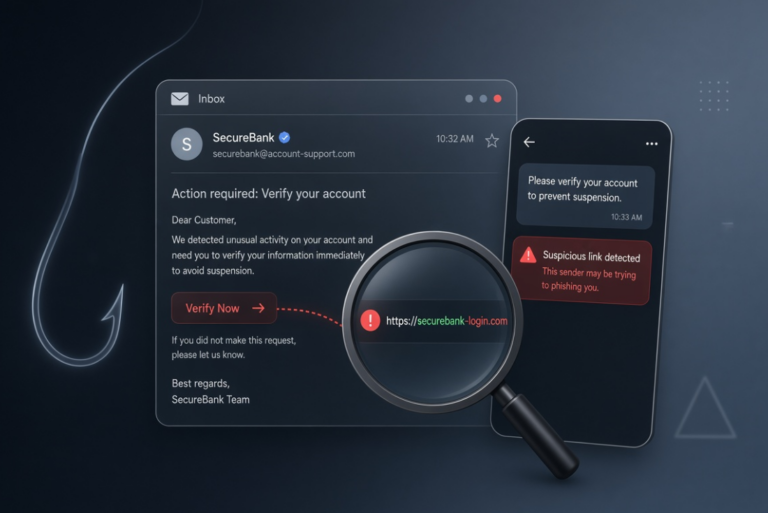
Phishing has always relied on trust. What has changed is the quality of the bait. Attackers now use generative AI to write messages that match your writing style, reference recent projects, or mimic the exact look of a colleague’s email. Multi-channel campaigns combine email, text messages, LinkedIn notes, and even voice calls. Deepfake audio and video have moved from novelty to real-world fraud. In one widely reported 2026 case, scammers used an AI-generated deepfake of a senior official in a video call to extract millions from a business professional.
These attacks succeed because they feel urgent and personal. A message might claim your package is delayed, your account needs immediate verification, or a boss is requesting a quick wire transfer. The goal is usually credentials, one-time codes, or direct payment.
How to protect yourself
Treat unexpected requests for money, passwords, or sensitive data with skepticism, even when they appear to come from someone you know. Verify through a separate channel—call the person on a known number or message them on a different platform. Enable multi-factor authentication everywhere it is offered, preferably using an authenticator app or hardware key rather than SMS. Hover over links before clicking and look for subtle misspellings in domain names. For organizations, regular short simulations that include text and voice scenarios help teams recognize the new patterns faster than traditional email-only training.
Ransomware That Combines Encryption with Extortion
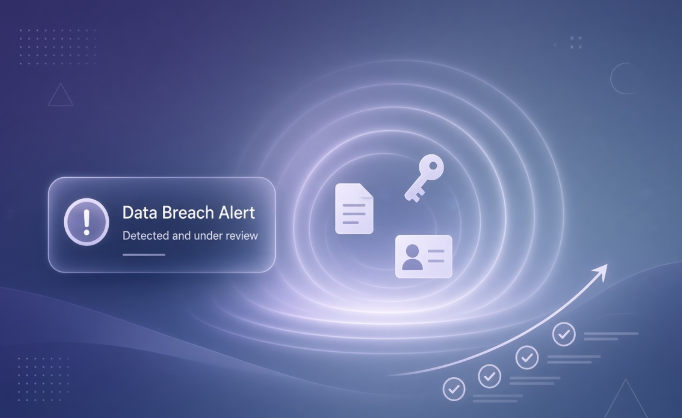
Ransomware groups still encrypt files, but many no longer stop there. They steal data first and threaten to publish it if the ransom is not paid. Double and triple extortion tactics have become common. ENISA continues to rank ransomware among the most impactful short-term threats, and Verizon’s 2026 data shows it involved in nearly half of confirmed breaches. Smaller organizations and individuals are not ignored; opportunistic groups often target anyone with valuable data and limited recovery options.
The financial pressure is real, yet payment rates have dropped as more victims refuse to negotiate and focus on recovery instead. Still, the disruption—lost productivity, regulatory headaches, and reputational damage—can last for months.
How to protect yourself
Maintain offline or immutable backups of critical files and test that you can restore them. Keep operating systems, browsers, and major applications updated. Restrict administrative privileges so everyday accounts cannot install ransomware freely. For businesses, segment networks so a single compromised device cannot reach everything. Incident response plans that include clear communication steps and legal contacts make a measurable difference when an attack occurs.
Unpatched Vulnerabilities and the Shrinking Window to Fix Them
One of the biggest shifts in recent reporting is the rise of vulnerability exploitation as the top initial access method. Verizon’s 2026 DBIR found it responsible for about 31 percent of breaches, surpassing credential abuse. Attackers move quickly: many public proof-of-concept exploits are weaponized within 48 hours. Edge devices such as VPNs, firewalls, and remote access gateways remain favorite targets. Zero-days still appear, but known and unpatched flaws cause far more damage in aggregate.
Home users face similar risks through outdated routers, smart devices, and neglected software. The longer a vulnerability remains open, the higher the chance it will be found by automated scanners.
How to protect yourself
Turn on automatic updates for your operating system, browsers, and office software. Check router firmware periodically and change default credentials. For any device that cannot be updated, isolate it from sensitive networks or replace it. Organizations should prioritize patching based on known exploited vulnerability lists and reduce the number of internet-facing services that are not strictly necessary. Continuous monitoring of exposed assets helps close the gap between discovery and remediation.
Supply Chain and Third-Party Risks
Attackers increasingly compromise the tools and services you already trust. A malicious update in a widely used software package, a compromised vendor account, or a tainted open-source library can give access to thousands of downstream users at once. Supply-chain incidents in 2025 and 2026 demonstrated how a single upstream breach can cascade across entire industries. AI development tools and package registries have become particularly attractive targets.
Even individual users are affected when a popular browser extension, mobile app, or cloud service is compromised.
How to protect yourself
Limit the number of third-party tools and integrations you use. Review permissions regularly and revoke access that is no longer needed. Prefer vendors that publish transparent security practices and rapid response timelines. For developers and technical teams, scrutinize dependencies, use software bills of materials where available, and monitor for unexpected changes in packages. Individuals should stick to official app stores and avoid sideloading software from unknown sources.
Credential Theft and Identity-Based Attacks
Many modern intrusions never need malware. Attackers steal or buy valid credentials, then move through systems using normal login flows. Infostealers remain active, harvesting passwords and session tokens from browsers. Cloud accounts and single sign-on platforms are high-value targets because one set of credentials can open many doors. Reports show a large share of detections are now malware-free, relying instead on legitimate tools and trusted identities.
How to protect yourself
Use unique, long passwords or passphrases for every important account and store them in a reputable password manager. Prefer passkeys where they are supported. Enable multi-factor authentication and consider hardware security keys for the most sensitive accounts. Monitor account activity for unfamiliar logins and revoke sessions when something looks wrong. For work accounts, avoid reusing personal credentials and be cautious about granting broad access to third-party apps.
Practical Daily Habits That Still Make a Difference
Technology alone is not enough. A few consistent habits close many of the gaps attackers exploit:
- Pause before clicking or responding to unexpected messages, especially those that create urgency.
- Keep devices and software current.
- Use strong, unique authentication.
- Back up important data in a way that ransomware cannot easily reach.
- Limit the amount of personal information shared publicly, since attackers use it to craft convincing messages.
- For remote work or travel, prefer trusted networks or a reliable VPN and avoid sensitive transactions on public Wi-Fi.
Small organizations benefit from the same principles applied at scale: clear ownership of patching, regular backup tests, least-privilege access, and a simple incident response checklist that everyone understands.
Frequently Asked Questions
Do I still need antivirus software in 2026?
Yes, but modern endpoint protection that includes behavioral detection and identity monitoring is more useful than traditional signature-based antivirus alone. Keep it updated and pair it with the habits above.
Are deepfakes a realistic threat for ordinary people?
They are increasingly used in targeted fraud against individuals and small businesses. Treat unexpected video or voice requests for money or credentials with the same caution you would apply to a suspicious email.
Is paying a ransom ever a good idea?
Most security experts and law enforcement advise against it. Payment does not guarantee recovery, funds further criminal activity, and may mark you as a willing target. Focus on prevention and tested recovery plans instead.
How often should I update my passwords?
Change them when there is evidence of compromise or when a service you use suffers a breach. Otherwise, unique strong credentials plus multi-factor authentication matter more than frequent forced changes.
What is the single most effective step I can take this week?
Enable multi-factor authentication on your email, banking, and primary work accounts, and turn on automatic updates for your main devices.
The threat landscape will keep evolving. AI will continue to lower the skill barrier for attackers while also giving defenders better detection tools. The organizations and individuals who fare best are those who treat security as an ongoing practice rather than a one-time project. Start with the highest-impact changes—authentication, updates, and backups—and build from there. Staying informed and acting on the basics remains the most reliable defense available right now.
About the Author